01 / 06
“Every run needs someone who knows SLURM.”
Build it visually
Drag stages onto a canvas. No DSL, no SLURM scripts. Anyone on your team can launch it.
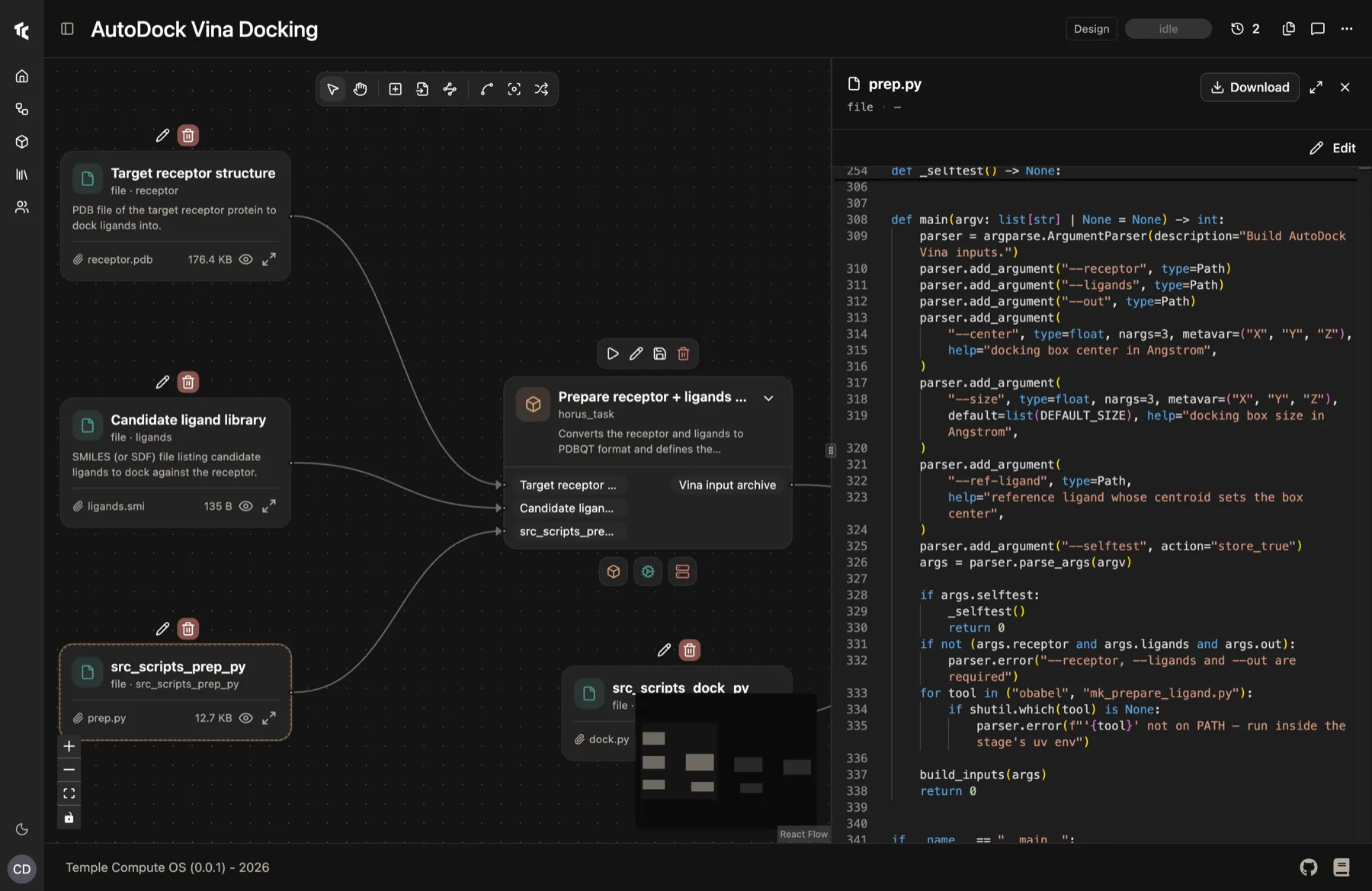
Run your data and compute pipelines across HPC clusters, cloud GPUs and your own machines. Your team gets results without waiting on engineering.
Backed by and running at








The problem
“For my team to use HPC I need DevOps engineers, and I can't find them.”
“To launch a run I depend on someone else having time.”
“Installing anything on the cluster means a security review.”
“Only the person who wrote the pipeline understands it.”
“Every loop from idea to result takes too long.”
It writes the jobs, moves the files and records every result. Your team does the part only it can do.
How Horus solves it
“Every run needs someone who knows SLURM.”
Drag stages onto a canvas. No DSL, no SLURM scripts. Anyone on your team can launch it.
“The notebook works. Getting it onto the cluster does not.”
Decorate a Python function as a task. The same code runs on HPC or cloud.
“Half my afternoon is scp.”
Inputs and outputs are staged over SSH between your machine, the cluster and the cloud.
“We pay GPU rates to prep data.”
CPU here, GPU there. HPC or cloud, chosen per stage.
“Ten thousand jobs means ten thousand terminals.”
Launch 10,000 simulations and track them from one place.
“Nobody remembers which parameters made that plot.”
Lineage from a plot back to the input data, parameters and machine. Cached artifacts are reused, not recomputed.
For IT and HPC
Horus reaches it over plain SSH. No daemons, no agents, nothing new for IT to review.
Horus talks to SLURM the way you do. No agent, no daemon, no service account.
Hours you already have get used first. Cloud only where you want it.
The Docker and Apptainer images your team already builds.
You choose which stage leaves the cluster, and which never does.
Hybrid, by default
One workflow fills your workstation, your GPU servers and your SLURM allocation to capacity. Only the work that does not fit spills over, to another machine of yours or to the cloud.
Workstations, GPU servers and your SLURM allocation take items from the same workflow.
Each machine runs as many items as its capacity allows. Extra items wait for a free slot.
When a machine is full, work spills to the next one you allowed: another of yours, or the cloud.
Cloud, on demand
When a stage needs a GPU, Horus creates the machine as the run reaches it and destroys it when the run ends. You pay in tokens only while it exists.
Horus creates the machine. You pick the CPUs, GPU and memory.
Simulate on SLURM, burst to the cloud, train on a cloud GPU.
Torn down when the run ends: success, failure or cancel.
Who it's for
“Every new idea needs an engineer first.”
“Every new tool means a security review and a queue of tickets.”
“I wait on someone else, then move files by hand.”
Life sciences and chemistry
Sensitive stages in house, heavy compute outside. Every result traced to its inputs.
Engineering and simulation
Thousands of solver runs across your cluster and the cloud, from one workflow.
AI and data teams
Prep data on CPUs, train on GPUs on demand. Nothing idle between runs.
Research computing centres
Self-service for every team, on the cluster you already run.
Agents can launch and track real workflows through MCP, with full traceability.
34 documented pipelines. Each one shows which stage runs where, and why there.
horus-runtime: free and open source
The engine under Horus. Install it today. AGPL v3.
No. Horus connects over plain SSH and stages files itself. No Horus software is installed on the cluster.
No. They build pipelines in the visual builder or with a Python @task decorator. Horus writes and submits the jobs.
Yes. Each stage declares its own resources, so every step runs on the hardware it needs: CPU, GPU, HPC or cloud.
No. For a stage you send to the cloud, such as a GPU stage, Horus creates the machine you specify when the run reaches it and destroys it when the run ends. You pay in Horus tokens only while it exists.
The engine is. horus-runtime is on GitHub and PyPI under AGPL v3.
Yes. Horus exposes workflows over MCP, so agents can build, run and inspect them.
Open Horus and run your first workflow, or start with the open-source runtime today.